The Targeting tab controls who sees your experience. You define audience filters using two kinds of signals: editorial (based on the content) and user (based on who the reader is and how they behave). Combine them to deliver the right experience to the right audience.
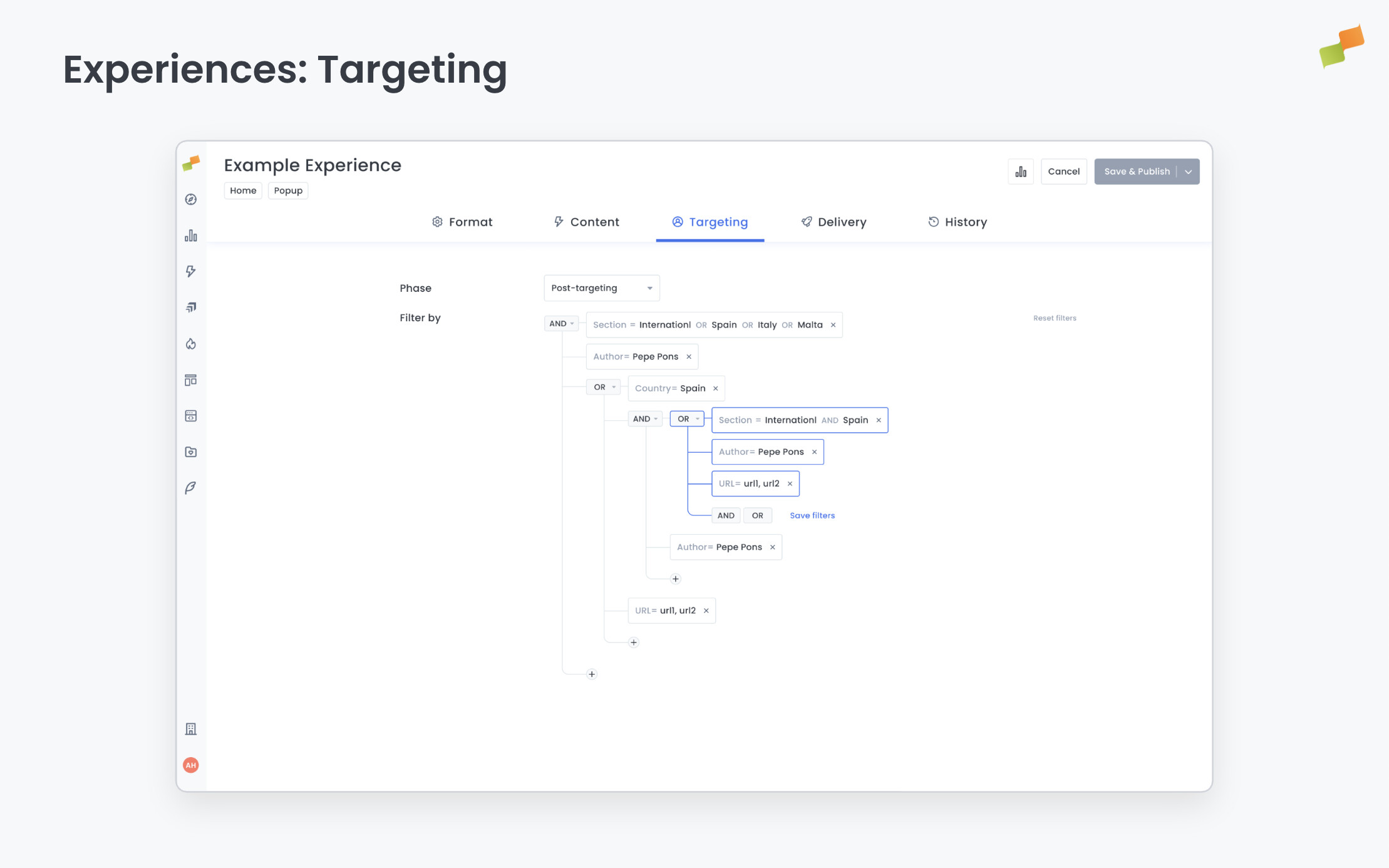
Targeting is available for all experience formats except API.
How targeting filters work
Targeting filters follow standard Marfeel filter logic:
- Values within the same dimension combine with OR (match any).
- Different dimensions combine with AND (match all).
- You can add the same dimension multiple times to create AND conditions. Example: Topic includes “Sports” AND Topic does not include “Tennis”.
Editorial signals
Editorial signals target based on the content the user is currently reading. Use them to match experiences to editorial context.
Available dimensions include section, topic, tag, author, content type, IAB category, article publish date, and more. For example, show a live sports scores widget only to users reading articles in the “Sports” section, or display a subscription prompt exclusively on evergreen content.
For the full list of editorial dimensions, see the Metrics and Dimensions Glossary.
User signals
User signals target based on who the reader is, where they come from, and how they behave. Use them to personalize experiences for specific audience segments.
Behavioral
Dimensions related to the current session, such as traffic source, campaign, medium, and consent status. You can also target user segments informed from a DMP or CDP, and use the Audience Loyalty dimension to differentiate between new users, lovers, or loyal users. For example, show a content recommender only to users arriving from social networks, display a subscription prompt only to loyal readers, or suppress an onboarding experience for users your CDP already identifies as subscribers.
Personal
Dimensions related to the user, such as device category, operating system, and geographic location. For example, display an upgrade CTA only to mobile users, or target a re-engagement prompt to users from a specific country.
Custom Vars
Dynamic properties injected via JavaScript or server-to-server enrichment from external systems (DMPs, CDPs, CRMs). Custom Vars come in four scopes: Page Vars (current page only), Session Vars (current session), User Vars (persistent per user), and User Segments (audience segments).
Custom Vars enable targeting based on data from external platforms. For example, pass subscription status from Piano, experiment groups from HubSpot, or propensity scores from your CDP.
Tag Experiences and Custom Vars: Pre-targeting Tag Experiences are the primary mechanism for populating Custom Vars from external systems without code deployment. A pre-targeting tag executes early in the page lifecycle — before targeting data is collected — and can read data from external platforms (your DMP, CDP, or third-party tools) and set it as Marfeel Custom Vars. These variables then become available as targeting dimensions for all experiences on that page load. See Tag Experiences for details.
Targeting phase
Every experience runs in one of two phases. The phase determines which dimensions are available and how quickly the experience evaluates.
| Phase | When it evaluates | Data available | Trade-off |
|---|---|---|---|
| Pre-Targeting | Immediately after SDK loads | Limited (client-side only): URL, Folder, Host, HTML Language, Browser Language | Faster execution, avoids visual flicker and data loss on very short pageviews |
| Post-Targeting | After a round-trip to Marfeel servers (<1s) | Full dimension set: all Pre-Targeting dimensions plus editorial signals (section, topic, author, content type, etc.) and user signals (loyalty, device, location, traffic source, etc.) | Slight delay, much richer targeting |
Choose Pre-Targeting when speed matters and you only need basic URL or language filters. Choose Post-Targeting when you need the full editorial and user signal set.
Tag Experiences and targeting phases: Tag Experiences follow a different pattern. Pre-targeting tags execute before either phase begins — they gather external data to enrich the targeting context. Post-targeting tags execute after the Post-Targeting phase completes and have access to the full targeting context, including all editorial and user signals. See Tag Experiences for the complete execution flow.
Important: The contains operator for URL splits on / and - characters and matches individual words. It cannot match multi-word hyphenated strings like word1-word2.
Goals-based targeting
Target users based on whether they have or have not achieved a specific conversion goal. This is one of the most powerful targeting strategies: it lets you suppress experiences for users who have already converted, and focus on those who haven’t.
Example: Show a newsletter subscription experience only to users who have not already subscribed. Set the goal dimension to your newsletter conversion goal and filter for “not achieved.” Or show an upgrade CTA only to users who haven’t converted to a paid plan.
Going deeper
- Experience Manager Overview: The four-tab editor walkthrough.
- Delivery & Scheduling
- Triggers
- Targeting
- A/B Testing
- Blueprints
- Inline: DOM injection, CSS selector placement, and visual element selector.
- Popups: Modal vs contextual modes, position, triggers, and orchestration.
- Flowcards: Isolated AMP rendering, snap points, card icons, and browser history integration.
- Tag Experiences: SDK configuration for tracking, integrations, and third-party tools.
- Recommender: Configure recommendation engines and layouts.
- Page Transformations
- Testing and Troubleshooting: Preview, live test, and debug your experiences.
- Web Activation: How the SDK delivers experiences on your site.
- AMP Activation: Run Flowcards on AMP pages.