In the realtime view, some articles do not show the title, author, image, or publication date. Instead, only the URL of the article appears without any image.
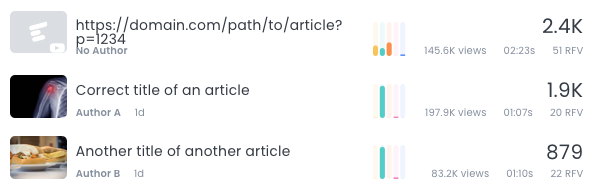
When does it happen?
This issue occurs on WordPress installations using Yoast in combination with a cache plugin like WPRocket, WP Super Cache, or others.
Why does it happen?
When publishing from WordPress an article to https://domain.com/path/to/new/article, Yoast initially sets the canonical as <link rel="canonical" href="https://domain.com/?p=12578" />. This short WordPress link returns a 301 redirect to the correct URL https://domain.com/path/to/new/article. This redirection is an important SEO error as explained below. When the cache is evicted some minutes later, the correct canonical <link rel="canonical" href="https://domain.com/path/to/new/article" /> is added to the article.
This is a known and reported bug to Yoast.
Why a redirect in a canonical can be harmful to your SEO strategy
A canonical URL should unambiguously point to the preferred version of a page. Adding a 301 redirect on a canonical is documented by Google as potential source of problems:
Incorrect canonical tags: Some content management systems (CMS) or CMS plugins can make incorrect use of canonicalization techniques to point to URLs on external websites. Check your content to see if this is the case. If your site is indicating an unexpected canonical URL preference, perhaps through incorrect use of
rel="canonical"or a 301 redirect, fix that issue directly.
Deepcrawl also recommends and documents:
Don’t canonicalize to a target that is noindexed, or returns a non-200 status
Sitechecker recommends to fix all non-200 canonicals and to avoid redirects:
fix URLs with canonical to non-200
Sitebulb has an explicit hint check to avoid canonical redirections:
The point of a canonical is to explicitly and unambiguously indicate a preferred URL. However in this situation, the canonical instructions are sending conflicting messages to the search engines, which typically means they will ignore the canonicals entirely and try to make their own decisions about what ‘the canonical URL’ should be.
Onely takes canonical redirects as site audit errors:
They will alert you of any incorrect canonicals, such as removed/missing pages (HTTP 4xx), server errors (HTTP 5xx), or redirects (HTTP 3xx) in canonical tags.
Why are other analytics tools not affected?
Marfeel creates a visual representation of a site based on the same rules Googlebot uses. In situations where Google would flag an issue, Marfeel surfaces it so users can address it as early as possible. Marfeel is not just an analytics platform but a tool that helps optimize your SEO strategy by following best practices and Google’s official recommendations.
Following this principle, Marfeel does not rely on explicit instrumentation provided to a tracking pixel. Instead, Marfeel relies exclusively on the structured data of your site to detect the title, author, image, and other metadata, the same way Google does.
This has two big benefits:
- Fast adoption. Site owners do not need to spend time instrumenting their site.
- Any effort to improve the instrumentation directly benefits your SEO strategy.
On the other hand, Marfeel always attributes the traffic of a URL to its canonical. This brings important benefits in terms of SEO and also in terms of analysis.
Solution
On the reported Yoast issue some users report non-official solutions while Yoast works on solving the issue.
Here is a code snippet to add in functions.php that some partners and customers have used:
// Fix per canonical Yoast
function prefix_filter_canonical_replace( $canonical ) {
  if ( is_single() ) {
        $canonical = get_the_permalink();
  }
  return $canonical;
}
add_filter( 'wpseo_canonical', 'prefix_filter_canonical_replace' );
Why do some articles show only a URL instead of title and image in realtime analytics?
On WordPress installations using Yoast with a cache plugin like WPRocket or WP Super Cache, Yoast initially sets the canonical to a short WordPress link that returns a 301 redirect. Marfeel reads the canonical to extract metadata, so a redirect causes the title, author, image, and publication date to be missing until the cache is evicted and the correct canonical is set.
Why is a 301 redirect in a canonical tag harmful to SEO?
A canonical tag should point to a URL that returns a 200 status. A 301 redirect sends conflicting signals to search engines, which typically ignore the canonical entirely and make their own decisions about the preferred URL. Google documents this as a potential source of problems.
How can I fix incorrect Yoast canonical redirects?
Add a filter in your WordPress functions.php that overrides the Yoast canonical with the actual permalink using the wpseo_canonical hook. Check the reported Yoast GitHub issue for community solutions and assess how they apply to your setup.