Marfeel Experience Manager now lets you save custom HTML layouts directly to your permanent layouts library, making it easy to reuse your work across multiple experiences.
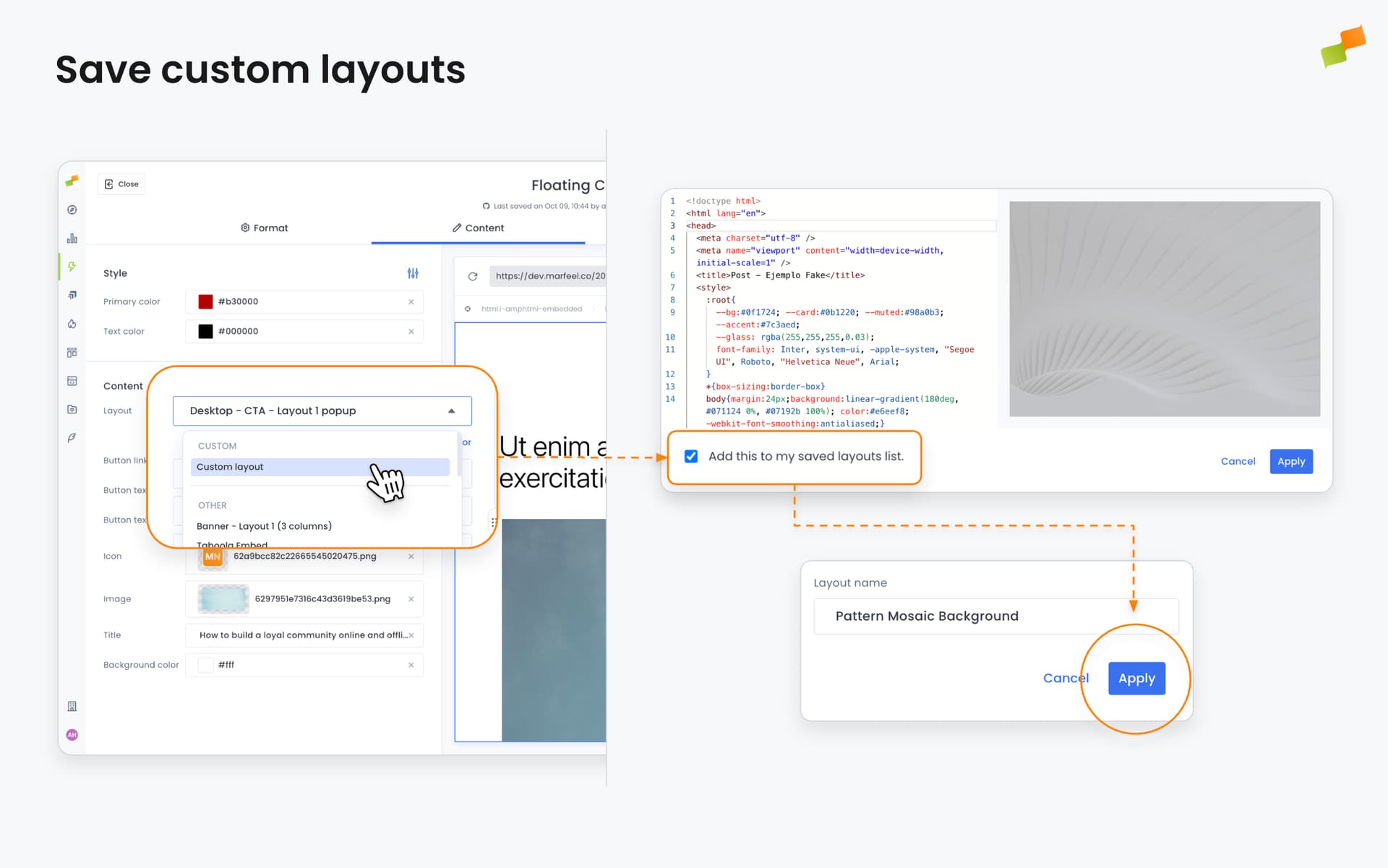
When creating experiences, you can build custom layouts inline using our editor. Previously, these custom layouts existed only within that specific experience. Now, you have the option to save them to your layouts library with a custom name, making them available for any future experience.
How It Works
- Create or edit a custom layout using the inline layout editor
- Preview your layout in real-time to ensure it renders correctly
- Check the save option and provide a name for your layout
- Your layout is added to your available layouts list for future use
The system validates your layout before saving to ensure it works properly. If you need more advanced editing capabilities, you can quickly jump to the full layout editor with a single click.
Benefits
Faster Experience Creation: Build once, reuse everywhere. Save time by avoiding the need to recreate custom layouts for each new experience.
Consistent Branding: Maintain consistency across your content experiences by reusing proven layout templates.
Improved Workflow: Access all your custom layouts alongside system-provided templates in one unified list.
This enhancement is available now in the Experience Manager for all users creating content experiences.